Listrix Pro 4.1.4
Listrix Pro v4.1.4
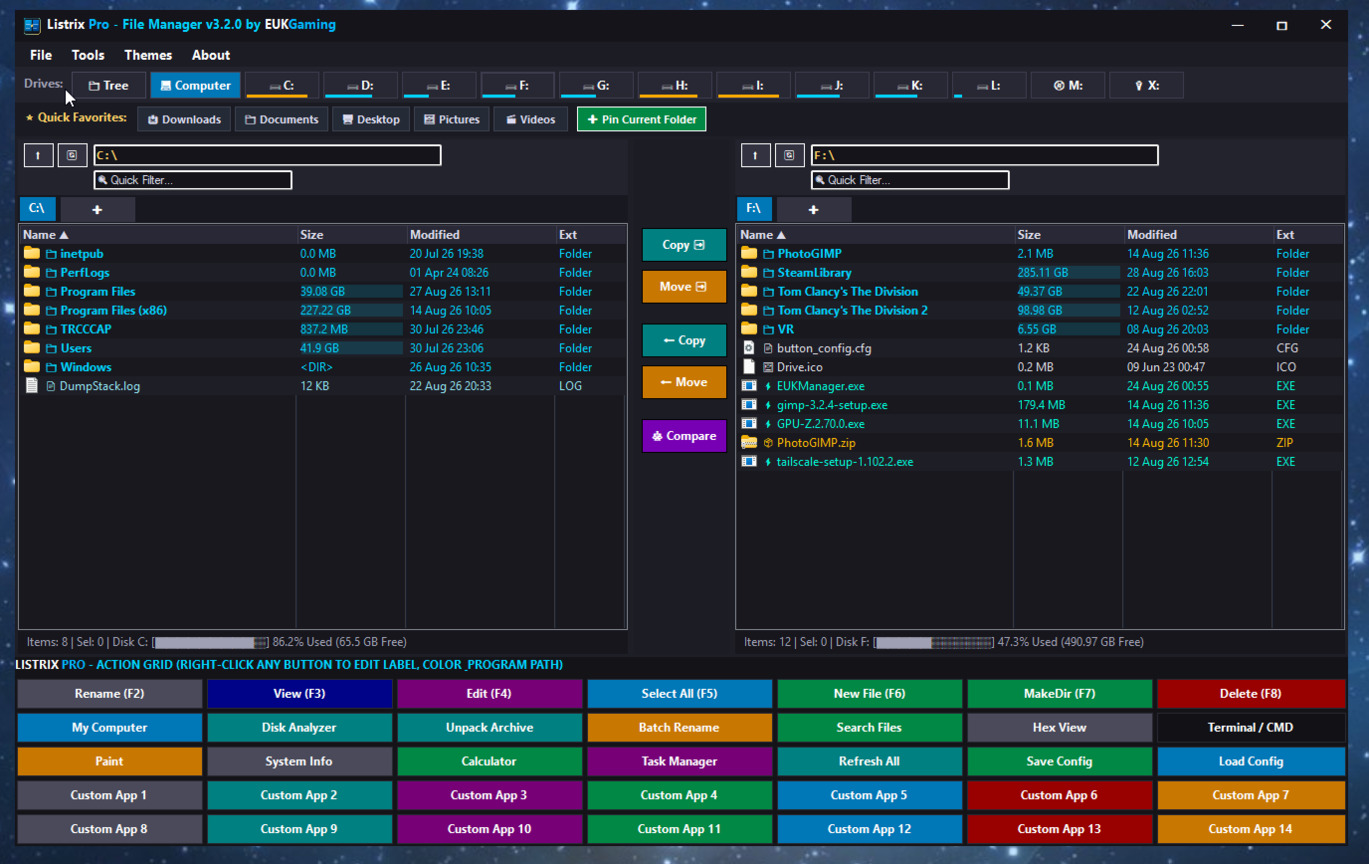
A high-performance, lightweight, 100% native Windows dual-pane desktop file manager and workstation suite.
Overview
Listrix Pro is a modern, ultra-fast, native dual-pane file management workstation for Windows. Built in pure native C# (.NET), it delivers a zero-bloat, instantaneous desktop file management experience with low memory usage, native dark theme aesthetics, deep Windows Shell integration, and a comprehensive suite of power tools.
Key Features
Dual-Pane Workstation Architecture
- Dual Independent Panes: Left and Right browser panes for seamless side-by-side file navigation, comparisons, and transfers.
- 1-Click Center Transfer Buttons: Quick transfer buttons to Copy or Move selections Left-to-Right and Right-to-Left.
- Swap Panes (`Ctrl + U`): Instant path swapping between Left and Right panes.
- Multi-Tab Browsing (`Ctrl + T` / `Ctrl + W`): Open unlimited directory tabs per pane with active tab highlights and quick-close buttons.
- Live "Computer" Drive Overview: Dynamic detection of all connected local, removable, and network drives with live usage meters, free space metrics, and drive type identification.
Smart File Collision & Overwrite Protection
When copying or moving files where a destination file with the same name already exists, EUKManager Pro presents a rich conflict resolution modal:
- Side-by-Side Metadata Comparison: Compares file paths, exact byte sizes, and last-modified timestamps between source and target.
- Overwrite: Replace the single conflicting file.
- Overwrite All: Replace all subsequent conflicting files without further prompts.
- Auto-Rename (Keep Both): Automatically renames incoming files (e.g., `filename (1).ext`) to preserve both copies.
- Skip: Leave the destination file untouched and proceed to the next item.
- Skip All: Skip all remaining existing files without prompting.
- Cancel: Safely halt the entire operation immediately.
- Cross-Drive File & Folder Safety: Automatic volume boundary detection with safe multi-drive directory tree cloning.
Search, Filter & Comparison Tools
- Instant Type-to-Filter Engine: Real-time live filtering of the active list as you type.
- Wildcard & Subdirectory Search: Supports wildcards (e.g. `*.zip`, `report_??.pdf`) and automatically scans nested subdirectories.
- 1-Click Select by Extension (`Ctrl + E`): Analyzes all file extensions in the active pane and lets you batch-select specific file types with one click.
- Folder Compare Engine: Compares files between Left and Right panes and visually highlights **Identical (Green)**, **Modified (Amber)**, and **Unique/Missing (Red)** items.
- Dedicated Search Modal (`Ctrl + F`): Deep recursive filesystem crawler with instant navigation upon double-clicking results.
Power Tools & Utilities
| Parallel Disk Space Analyzer | Multi-threaded directory size analyzer with visual usage meters, percentage bars, and file counts. |
| MD5 Duplicate File Finder | Scans folders for duplicate files using MD5 cryptographic hashing with 1-click auto-selection and safe deletion. |
| Batch Multi-File Renamer (`Ctrl + R`) | Powerful batch renaming with search/replace, prefixes, suffixes, start numbers, and zero-padded digit formatting (`001`, `01`, `1`). |
| Universal Archive Extractor | 1-click extraction for `.zip`, `.7z`, `.rar`, `.bz2`, `.bzip`, `.tar`, and `.gz` archives with folder browsing and folder creation. |
| Native Media & Music Player | Built-in dark audio/video player for `.mp3`, `.wav`, `.flac`, `.m4a`, `.wma`, `.aac`, `.ogg`, `.mp4`, `.mov`, `.avi`, `.wmv`, `.flv`, `.webm` with animated 24-bar live spectrum equalizer, seek bar, volume control, fullscreen (`F11`), and external VLC integration. |
| Built-in Text Editor (`F4`) | Lightweight in-app text file editor with UTF-8 support. |
| Raw Hex Byte Viewer | Inspect raw binary file contents with hexadecimal offsets and ASCII character representations. |
| Windows Compatibility Editor | Inspect file properties, size on disk, and configure Windows Compatibility Flags (Windows 7/8/XP/Vista/98/95, Admin privilege, Fullscreen optimizations). |
Customization & Aesthetics
- Real 32-Bit Windows Shell Icons: Dynamically loaded system file and folder icons via Windows Shell API (`SHGetFileInfo`).
- Inline File Size Bars: Visual colored usage bars in the file list size column for quick storage auditing.
- Collapsible Directory Tree Sidebar (`Ctrl + B`): Hierarchical folder tree for rapid navigation.
- 4 Curated Themes:
- Modern Dark (Default)
- Opus Light
- Retro Classic Blue
- Cyberpunk Neon
- 35-Button Customizable Action Grid (5×7): Configure bottom action buttons with custom text, background colors, and external executable shortcuts (`.exe`, `.bat`, `.cmd`).
- Quick Favorites Ribbon: Pin frequently used directories to the top ribbon for instant 1-click access.
- System Tray Integration & Auto-Start: Minimize to system tray with custom dark notifications, tray context menu, and optional auto-run at Windows startup.
- Integrated Web Auto-Updater: Built-in update check against the official release manifest with one-click downloader and installer.
- Memory Compactor: Low memory footprint with working set management and zero GDI resource leaks.
Keyboard Shortcuts
| `Ctrl + T` | Open new directory tab in active pane |
| `Ctrl + W` | Close active directory tab |
| `Ctrl + B` | Toggle Collapsible Directory Tree Sidebar |
| `Ctrl + E` | Open 1-Click Select by Extension modal |
| `Ctrl + F` | Open Find / Search Files modal |
| `Ctrl + R` | Open Batch Multi-File Renamer |
| `Ctrl + U` | Swap Left and Right pane paths |
| `F2` | Rename selected file or folder |
| `F3` | View / Open file (or extract archive) |
| `F4` | Edit file in built-in editor |
| `F5` | Select All / Deselect All items in pane |
| `F6` | Create new empty file |
| `F7` | Create new directory (Make Folder) |
| `F8` / `Delete` | Delete selected items |
| `F11` / `Escape` | Toggle Fullscreen (in Media Player) |
| `Dbl-Click Title Bar` | Maximize / Restore Window |
System Requirements
- **Operating System**: Windows 11, Windows 10, Windows 8.1 / 8, Windows 7 (64-bit & 32-bit).
- **Framework**: Microsoft .NET Framework 4.0 or higher (pre-installed on Windows 10 & 11).
Contact & Support
- Developer: EUKGaming
- Website: https://www.eukgaming.co.uk
- Email: jaguar@eukgaming.co.uk
You must be logged in to purchase or download this item.
Login to Continue